 TextLantern
The person setting up TextLantern needs Manage Server. The bot needs the permissions below to read messages and reply. These are permissions for two different accounts: yours and the bot’s.
What the bot needs
| Permission | What TextLantern uses it for |
|---|---|
| View Channels | See the channel you want to translate |
| Read Message History | Retrieve the message being translated |
| Send Messages | Reply with a translation in the channel |
| Send Messages in Threads | Post translations inside a thread |
| Embed Links | Show the formatted translation card |
| Manage Threads | Manage translation threads and their members |
| Change Nickname | Use the bot name chosen for this server |
Discord’s server authorization screen also includes Use Application Commands. That does not replace the personal installation described below.
Private translation works, but automatic translation does not?
You can use Translate privately or /t, yet a new message in a server channel receives no automatic reply. Start with the server path below. A private result confirms that your personal request worked; it does not confirm that the server bot can see or reply in that channel. Discord distinguishes apps added to an account from apps added to a server.
The following is a diagnostic example based on TextLantern’s implementation and Discord’s documentation, rather than a recorded incident or a tested repair.
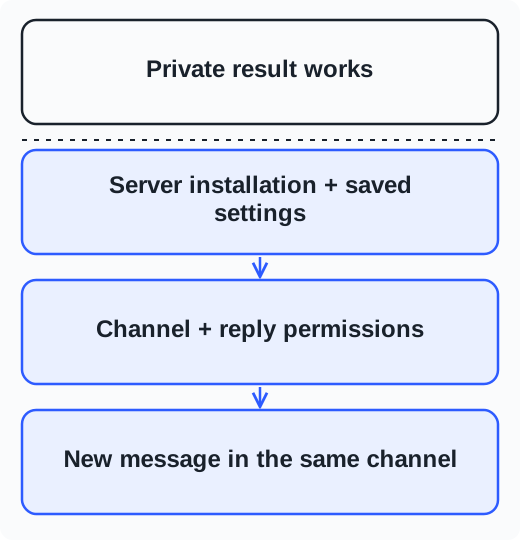
- Check the server installation. Look for TextLantern in the affected server’s member list and open that server in the TextLantern manager. Adding the app to your own account does not install the server bot. Ask someone with Manage Server to check the server setup if you cannot manage it.
- Check the exact channel’s saved settings. Confirm that automatic translation is enabled, the setup is complete, and the intended main languages are saved. Note the reply location: the original channel or a thread. Your personal target language does not configure automatic translation for the channel. See the channel setup guide.
- Check what the bot can see and send. In Discord, open the affected channel’s permissions. Check @everyone, every role assigned to the bot, and any override assigned directly to TextLantern. Also check whether the channel is synced with its category. The resulting permissions need to allow View Channels, Send Messages, Embed Links, and Read Message History for the relevant operations. A server-level allow alone does not establish access to that channel.
- Check the actual reply destination. If replies go into a thread, check Send Messages in Threads and Manage Threads, as well as the bot’s access to that thread. Discord treats sending in a channel and sending in a thread separately. If channel replies work but thread replies do not, focus on this step before changing unrelated permissions.
- Change one relevant setting, then retest. For example, if a direct channel override denies Send Messages to TextLantern, an authorized administrator can correct that override and save it. Send a new, short text message from a human account in the same channel, using one of its main languages. Check the configured reply location. Record the original setting, the change, and whether a new reply appears; a private result alone is not the success criterion.
- If the reply is still missing, keep the diagnosis open. Check the manager for a server activation, allowance, or service warning. Emoji-only messages and bot/webhook messages are unsuitable test cases; unclear language can also prevent an automatic text translation. If several correctly configured channels fail, contact support with the server/channel IDs, time and time zone, reply location, and any visible error. Message delivery and service availability need separate investigation; adding Administrator does not identify the cause.
Discord explains channel permission overwrites and thread permissions. Keep the working channel’s settings available for comparison, and share only the information needed to investigate.
Works in one channel, but not another?
- Open the affected channel’s permission settings in Discord.
- Check the bot’s role and any permissions assigned directly to TextLantern. A channel override can deny access even when the server role allows it.
- Check the reply location. Thread translations also need Send Messages in Threads and Manage Threads.
- Restore the missing permission and try another message.
Compare the working channel’s TextLantern settings too; it may use a different language pair or reply location.
Cannot find the message action or command?
For personal translation, check User Settings → Authorized Apps for TextLantern. The message action and /t come from adding it to your own Discord account. Seeing the bot in a server’s member list is not enough.
For server setup commands, an administrator should check the app’s command access and your Manage Server permission.
See permissions and access questions for thread membership and nicknames, or troubleshooting if translations still do not appear.